
Activity Monitor
Know what happens on every office PC — minute by minute.

What is Activity Monitor?
The Activity Monitor addon watches your office computers so you don’t have to. A tiny Windows agent records activity minute by minute and streams it to your HDeBooks dashboard — with offline spooling, so even a shutdown or power cut loses at most a minute of data.
What Activity Monitor does.
A small background agent runs silently on each office PC. No toolbars, no popups, no slowdown for your staff.
Activity is captured and uploaded every minute, giving you a near-live picture of every workstation.
If the network drops or the PC shuts down, records are saved to a disk queue (up to 50,000 records) and uploaded on reconnect. Nothing is lost — and nothing is silently dropped.
Each HDeBooks install issues its own agent keys. A key from one install never works on another — by design.
See who is active, on which PC, and when — with per-user and per-application summaries for any date range.
Set your high-risk keywords and matching window titles are highlighted in red automatically. A Risky-only filter pulls every flagged minute into one fast review list.
Data is scoped to your business only, served over your own server. Your team’s activity never leaves your system.
Total Agents, Live Now, Inactive and Logs Today at a glance. Live Agents shows green/red dots with last-seen time — live means uploaded during the current shift.
Set shift start/end once and reports group by shift day instead of calendar day, with a daily per-app summary and a Summary of all apps table across agents.
The clock pauses after 5 idle minutes (configurable) — except when a calling or meeting app (Zoom, Teams, Skype, WebEx, Meet) or a VICI dialer window is in front. Browsing and dialer time always count.
A monitor + watchdog pair restart each other in seconds, and an unexpected kill uploads a tamper event within seconds — listed on Live Agents with time, agent and detail. The agent GUI itself is password-protected.
See it working.
Installs in minutes, runs forever
Create a key, run the installer on each PC, and the dashboard starts filling — even through reboots and outages.
- ✓ One agent key per install, created in seconds
- ✓ Survives shutdowns, crashes and network drops
- ✓ Queued data uploads automatically on reconnect
Answers, not just data
Who was active at 11pm? Which PC idles most? The reports turn raw minutes into management answers.
- ✓ Per-user daily activity summaries
- ✓ Per-application usage breakdowns
- ✓ Date-range reports for reviews and audits
Using Activity Monitor, step by step.
From a fresh install to daily routine — here's the whole journey.
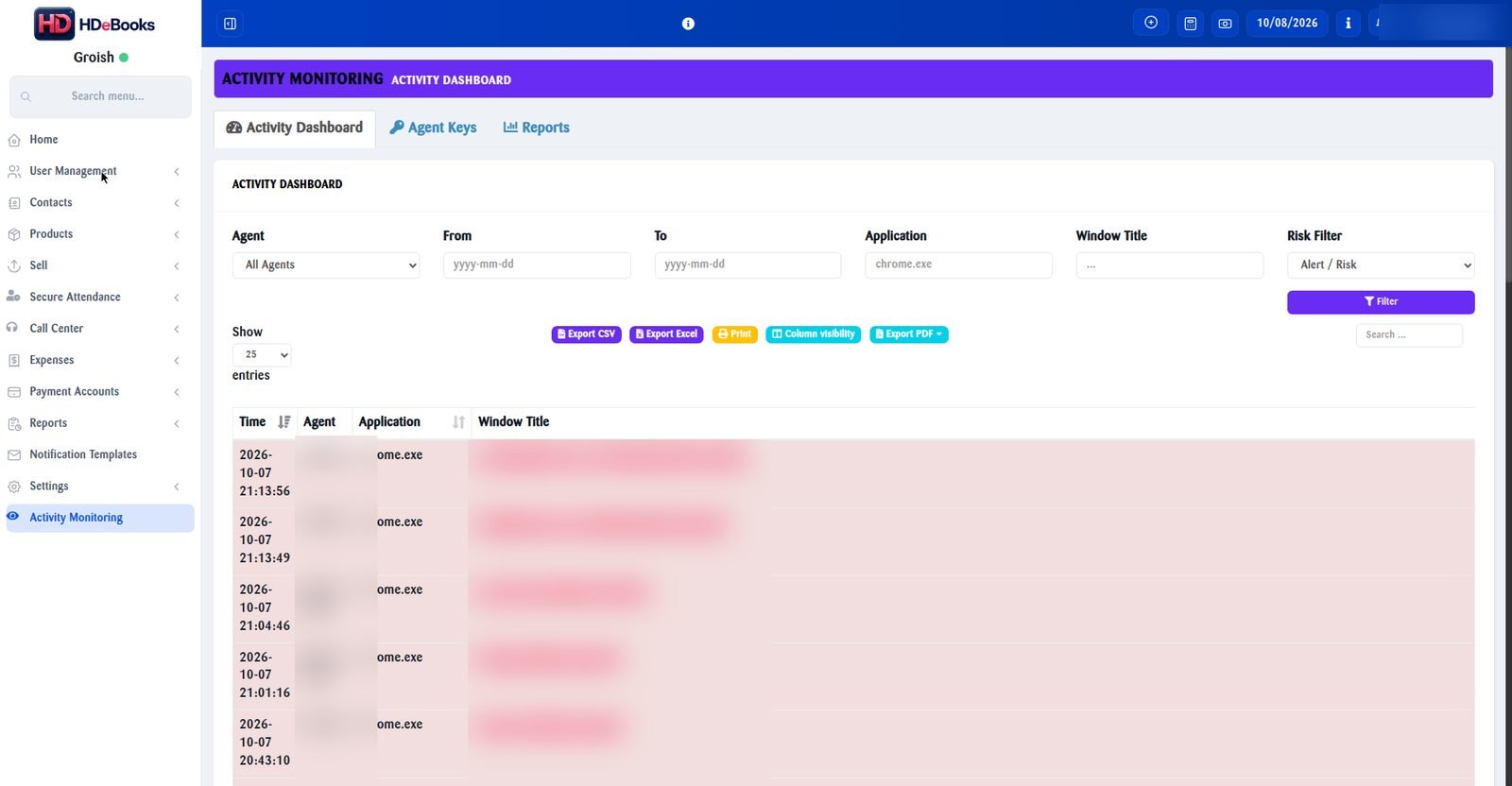
Real screenshot — staff data blurred for privacy. Click to enlarge.
Create an agent key
In HDeBooks go to Activity Monitoring → Agent Keys and generate a key. It takes seconds — and it only ever works on this install.
- Keys are per-install by design: a key from one install is rejected on another
- Create separate keys per office or department if you like
- Deactivate a key instantly when a PC is retired
Install the agent on office PCs
Run the Windows installer on each computer, paste your HDeBooks URL and the agent key. The agent starts silently — no toolbars, no popups.
- Lightweight background agent, minimal CPU and memory use
- Staff are not interrupted in any way
- One installer covers every workstation
Confirm the first heartbeat
Within a minute the PC appears on your dashboard and activity starts streaming in. If a PC never shows up, the key or URL is wrong — the dashboard tells you.
- Activity captured and uploaded every minute
- Live "Active now" status per workstation
- A green connection test alone does not prove the key — real data arriving does
Label each workstation
Give every PC a clear name — user, seat or department — so reports read like plain English instead of machine names.
- Rename PCs any time from the dashboard
- Group by office, floor or team
Review activity & reports
Open the dashboard for the live picture, or run reports when you need answers for reviews and audits.
- Per-user daily activity summaries
- Per-application usage breakdowns
- Any date range, exportable for your records
Relax — outages are covered
Internet down? PC shut down mid-day? The agent spools every record to disk locally and uploads everything automatically on reconnect.
- At most ~60 seconds of data at risk, even on a hard shutdown
- Queued records upload immediately on next start
- Corrupt spool lines are skipped, never blocking the queue
Activity Monitor questions.
No. It runs silently in the background with minimal CPU and memory use, and does not interrupt work in any way.
The agent spools records to disk locally and uploads everything automatically when the connection returns.
No — keys are per-install by design. Each HDeBooks installation issues and accepts only its own keys.
The agent logs activity presence and application usage for productivity reporting. It is an activity monitor, not spyware.
Yes. Configure high-risk keywords and any window title matching them is highlighted in red on the dashboard. The Risky-only filter shows just the flagged entries for fast review.
More addons.
Manufacturing
Recipes, production batches and true costing for manufacturers, bakeries, restaurants and workshops.
Read more →Call Center
Call logging, lead pipeline and agent performance tracking for sales and support teams.
Read more →Secure Attendance
Attendance, shifts, leave and payroll automation with selfie + location verification.
Read more →Ready to run your entire business on HDeBooks?
Tell us about your business and we'll set up a free demo — POS, billing, inventory, accounts, HR, payroll and CRM, plus the addons you need.