
Call Center
Every call logged. Every lead followed up. Nothing slips.

What is Call Center?
The Call Center addon turns HDeBooks into your team’s phone hub. Log every inbound and outbound call with dispositions and notes, push callers into a lead pipeline, assign agents, schedule callbacks — and measure it all with agent performance and disposition reports.
What Call Center does.
Log every call with direction, duration, notes and outcome — a complete history per contact, searchable in seconds.
Tag each call: interested, not interested, wrong number, busy, no answer. Your reports finally speak the team’s language.
Move callers into a visual pipeline — new, contacted, qualified, converted — and drag them forward as they progress.
Assign leads and callbacks to specific agents. Everyone knows exactly whose court the ball is in.
Schedule callbacks with date and time. Overdue follow-ups surface automatically so no hot lead goes cold.
See calls per agent, conversion by disposition, and follow-up completion — the numbers behind your sales floor.
Fix a wrong entry after the fact — admins can edit any call, agents their own — with a detail page showing follow-ups and change history.
Import leads from CSV with duplicate phone numbers skipped and reported. A Duplicates-only filter and per-lead duplicate list keep the pipeline clean.
Due and overdue reminders generate automatically, with a bell badge in the menu, a notifications page with mark-read, and a Due Today filter.
Calls-per-day trend, daily call target vs achieved with a % badge, after-hours call counts and CSV export — with an agent filter across every table.
See it working.
From first ring to closed deal
A caller becomes a lead becomes a customer — in one flow, inside the same system as your billing.
- ✓ One-click: convert any call into a pipeline lead
- ✓ Pipeline stages match how your team actually sells
- ✓ Customer history links back to the original calls
Callbacks that never get forgotten
Promise a callback at 3pm? It waits for the agent at 3pm — and escalates if it slips.
- ✓ Date/time callbacks per lead
- ✓ Overdue list on the dashboard
- ✓ Per-agent follow-up completion rates
Using Call Center, step by step.
From a fresh install to daily routine — here's the whole journey.
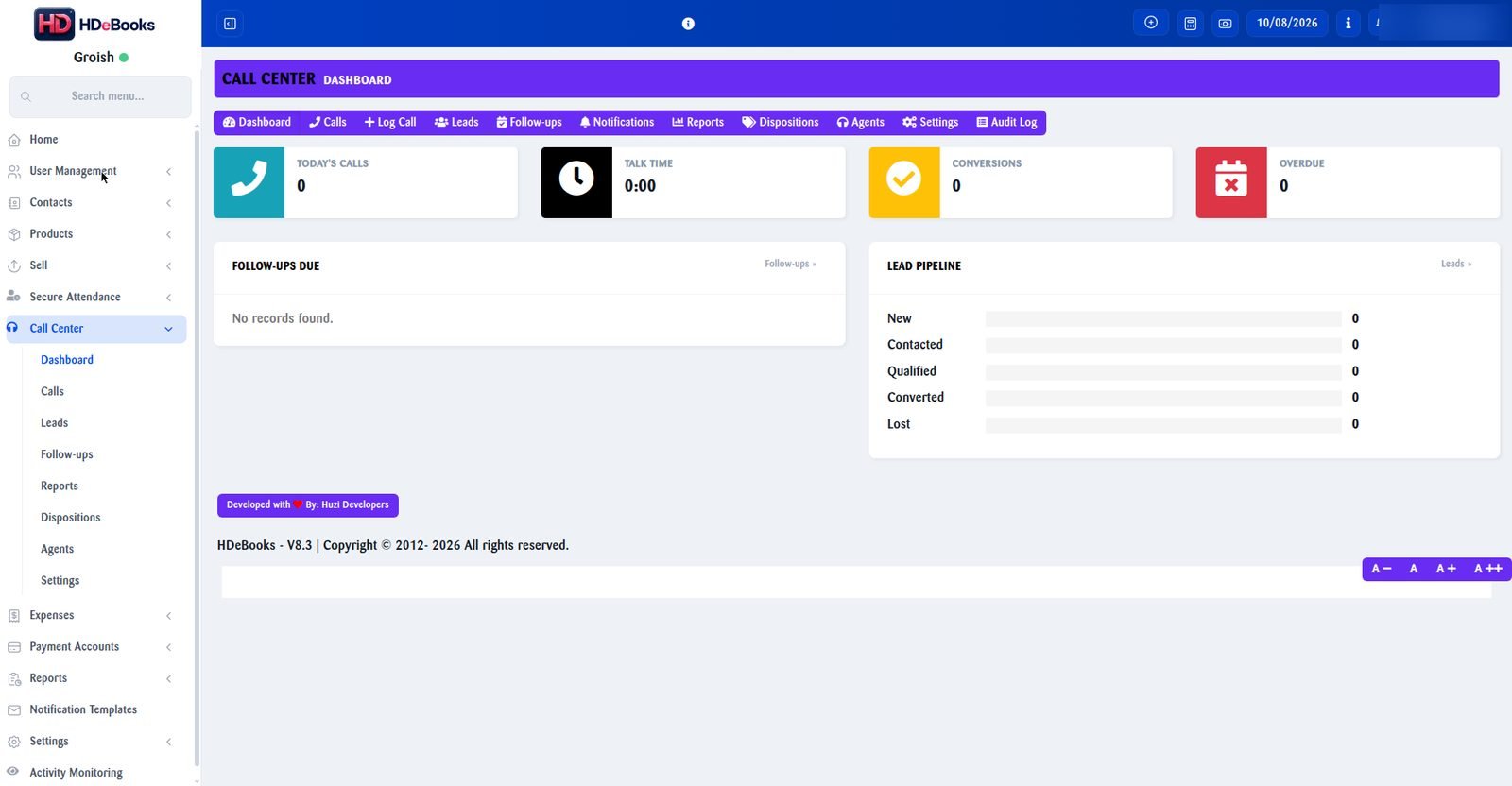
Real screenshot — staff data blurred for privacy. Click to enlarge.
Add agents & dispositions
In Call Center → Settings, add your agents and define the dispositions your team actually uses on calls.
- Dispositions like Interested, Not Interested, Busy, Wrong Number, No Answer
- Reports later break down conversion by these exact labels
- Add or rename dispositions any time as scripts evolve
Log every call
After each call the agent logs it in seconds: direction, duration, disposition and notes. This history becomes your most valuable sales asset.
- Inbound and outbound, with duration tracked
- Free-text notes per call — objections, prices quoted, promises made
- Full searchable history per contact
Turn callers into leads
Interested caller? Convert the call into a pipeline lead with one click — no retyping names or numbers.
- Set the pipeline stage: New, Contacted, Qualified…
- Assign the lead to a specific agent
- Lead sources tracked so you know what converts
Schedule callbacks that don’t slip
"Call me Thursday at 3" becomes a real reminder. The agent sees it on time — and if it goes overdue, it gets flagged.
- Date and time callbacks per lead
- Overdue follow-ups surface on the dashboard automatically
- Per-agent follow-up completion rates keep everyone honest
Work the pipeline daily
Move leads forward as they progress. Everyone sees the same board, so nothing hides in notebooks or memory.
- Stages match how your team actually sells
- Converted leads link into customer records with history attached
- Lost leads keep their reason — fuel for better scripts
Measure every week
Open the reports and the story of your sales floor tells itself — who calls, who converts, who follows up.
- Calls and conversions per agent
- Conversion rate by disposition
- Follow-up completion and overdue trends
- Supervisors get module-admin rights without full system admin
Call Center questions.
No — the addon is a logging and pipeline system. Agents log call details, outcomes and notes; it does not tap phone lines or record audio.
Yes. Access is role-based, and specific users can be granted module-admin rights without becoming full system admins.
Scheduled callbacks appear on the agent’s dashboard list, and overdue ones are flagged so nothing is missed.
Yes — converted leads link into your customer records, so the sales history stays attached to the billing account.
Yes — import a leads CSV and duplicate phone numbers are skipped and reported, so the same contact never enters the pipeline twice.
More addons.
Manufacturing
Recipes, production batches and true costing for manufacturers, bakeries, restaurants and workshops.
Read more →Activity Monitor
A lightweight Windows agent that logs PC activity to your HDeBooks dashboard.
Read more →Secure Attendance
Attendance, shifts, leave and payroll automation with selfie + location verification.
Read more →Ready to run your entire business on HDeBooks?
Tell us about your business and we'll set up a free demo — POS, billing, inventory, accounts, HR, payroll and CRM, plus the addons you need.