
Secure Attendance
Selfie punch-ins, geofence-verified, payroll-ready.

What is Secure Attendance?
Secure Attendance replaces registers and guesswork with verified digital attendance. Staff punch in with a selfie, the system checks they are inside your geofence, late arrivals and overtime are calculated against their shift automatically — and payroll practically writes itself.
What Secure Attendance does.
Every punch captures a selfie, served securely through your own server — no public links, no missing images.
Punches outside your location radius are flagged and excluded from attendance and payroll automatically.
Different timings per department, overnight shifts and per-shift breaks — late and overtime calculate against the right shift.
Present days, absents, overtime and deductions flow into payroll. Edit figures, pay salaries, and export — all in one place.
Annual, casual, sick and custom leave types with yearly allowances. Requests, approvals and balances in one view.
Record salary advances, deduct them at payroll time, and keep a full payment ledger per employee.
Admins can add missed punches or force-punch within the shift window — every override is stamped with who did it.
Give trusted staff module-admin, force-punch or manual-attendance rights without making them system admins.
Detail and summary attendance reports, plus full export menus — CSV, Excel, Print, Column visibility and PDF — on Employees, Payroll and Summary tables.
A per-employee month grid: gray for off days and holidays, red for absent, green for on time, orange for short hours, amber for leave — with late time inside each day cell.
Late Deduction Mode (half-day, hourly, per-minute, or fixed slab — every N lates deducts a fixed amount), grace period that is never deducted, and punch-requirement checkboxes for geofence, IP and selfie.
Payroll auto-calculates the moment you open it — no Run button — and future days of the month never count as absent. Saved runs stay untouched.
Upload your company logo once and it prints on every payslip, with full Basic Salary, separate Absent and Late lines, and one-click Print All Payslips with a page break per employee.
See it working.
Attendance you can trust
A punch only counts when the right person is in the right place at the right time.
- ✓ Selfie captured on every punch
- ✓ Out-of-geofence punches flagged, not counted
- ✓ Late arrivals detected against shift timings
Payroll that writes itself
Attendance, overtime, leaves and advances flow straight into the payroll run.
- ✓ Auto-calculated present days, overtime and deductions
- ✓ Weekly-off days honored per business
- ✓ Editable figures with full payment history
Using Secure Attendance, step by step.
From a fresh install to daily routine — here's the whole journey.
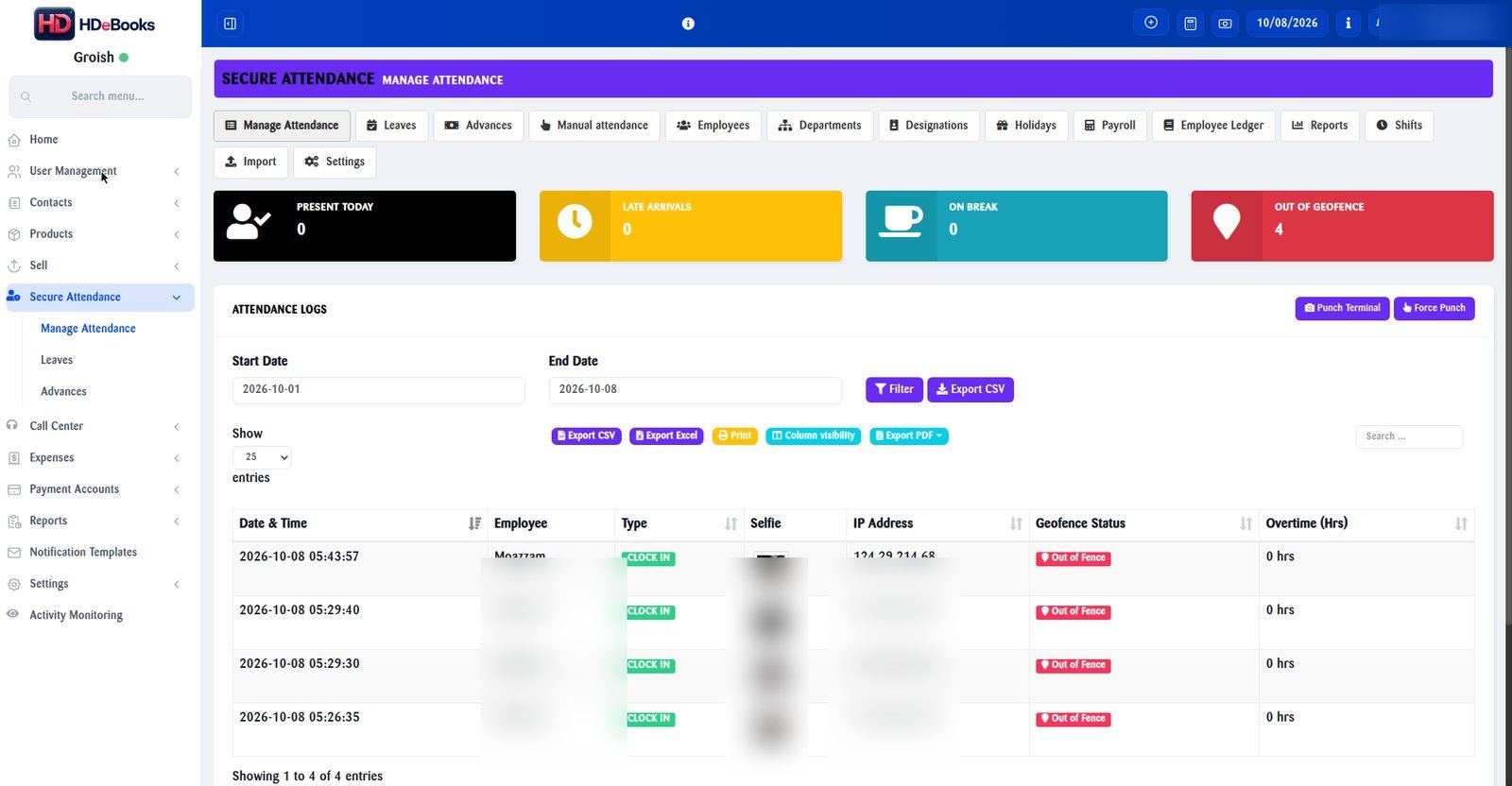
Real screenshot — staff data blurred for privacy. Click to enlarge.
Configure company settings
In Secure Attendance → Settings, set the rules every punch is judged against. Get these right once and the whole system runs itself.
- Geofence: your office latitude, longitude and radius
- Allowed IP subnets for office-network verification
- Grace period, standard shift hours and overtime multiplier
- Weekly-off days (e.g. Saturday & Sunday) per business
Create departments & shifts
Different teams work different hours — the addon handles that. Build one shift per department, or a company default.
- Overnight shifts fully supported (e.g. 22:00 – 06:00)
- Per-shift break windows, excluded from worked hours
- Late arrivals and overtime calculate against the right shift
Add employees & leave allowances
Import or add your staff, assign each person a department and shift, then set yearly leave allowances.
- Annual, Casual and Sick types plus your own custom types
- Yearly day allowances editable per leave type
- Joining dates, departments and designations tracked
Grant access to supervisors (optional)
Need a manager to handle attendance without full system admin? Give them exactly the rights they need — nothing more.
- Specific user access: module admin, force punch, manual attendance
- Managed from a simple dropdown in Settings (real admins only)
- Sensitive payroll settings stay protected automatically
Staff punch in with a selfie
Employees open the punch page and take a selfie to clock in or out. The system verifies the rest on its own.
- Selfie captured on every punch, served securely from your server
- Location checked against your geofence in real time
- Out-of-geofence punches are flagged — recorded but not counted toward attendance or payroll
Handle leaves, advances & corrections
Day-to-day exceptions are handled in a few clicks — and every override is stamped with who did it.
- Approve or deny leave requests with balances updated live
- Record salary advances, auto-deducted at payroll time
- Manual attendance and force punch within the shift window, stamped with the admin’s name
Run payroll & export reports
At month end, open Payroll — present days, overtime, leaves and deductions are already calculated.
- Auto-calculated figures you can still edit before paying
- Record salary payments with full per-employee history
- CSV exports: employees, payroll and per-employee summaries
- Detail & summary attendance reports with employee and date filters
Secure Attendance questions.
The punch is recorded and flagged as out-of-geofence, but it does not count toward attendance, worked hours or payroll.
Yes — shifts can span midnight, with per-shift break windows, and late/overtime calculate correctly across the night.
Yes. Admins can add manual attendance or force-punch within the shift window; every override is stamped with the admin’s name.
Approved leaves reduce payable days per your rules, and recorded advances deduct automatically when payroll is generated.
More addons.
Manufacturing
Recipes, production batches and true costing for manufacturers, bakeries, restaurants and workshops.
Read more →Call Center
Call logging, lead pipeline and agent performance tracking for sales and support teams.
Read more →Activity Monitor
A lightweight Windows agent that logs PC activity to your HDeBooks dashboard.
Read more →Ready to run your entire business on HDeBooks?
Tell us about your business and we'll set up a free demo — POS, billing, inventory, accounts, HR, payroll and CRM, plus the addons you need.