
Portal
Your team’s front door to HDeBooks — punch in, check attendance, request leaves, see payslips.
What is Portal?
The Portal gives every employee their own front door to HDeBooks. They punch in and out from the clock terminal, check their attendance calendar, request leaves and view payslips — while admins run the team roster, approve requests, compute payroll and pull reports from the same place. A built-in call-center side lets agents log calls, manage leads and work follow-ups, and a full finance suite (expenses, income, accounts, P&L, balance sheet) runs the company money — all with role-based access, so each person sees only what they are allowed to.
What Portal does.
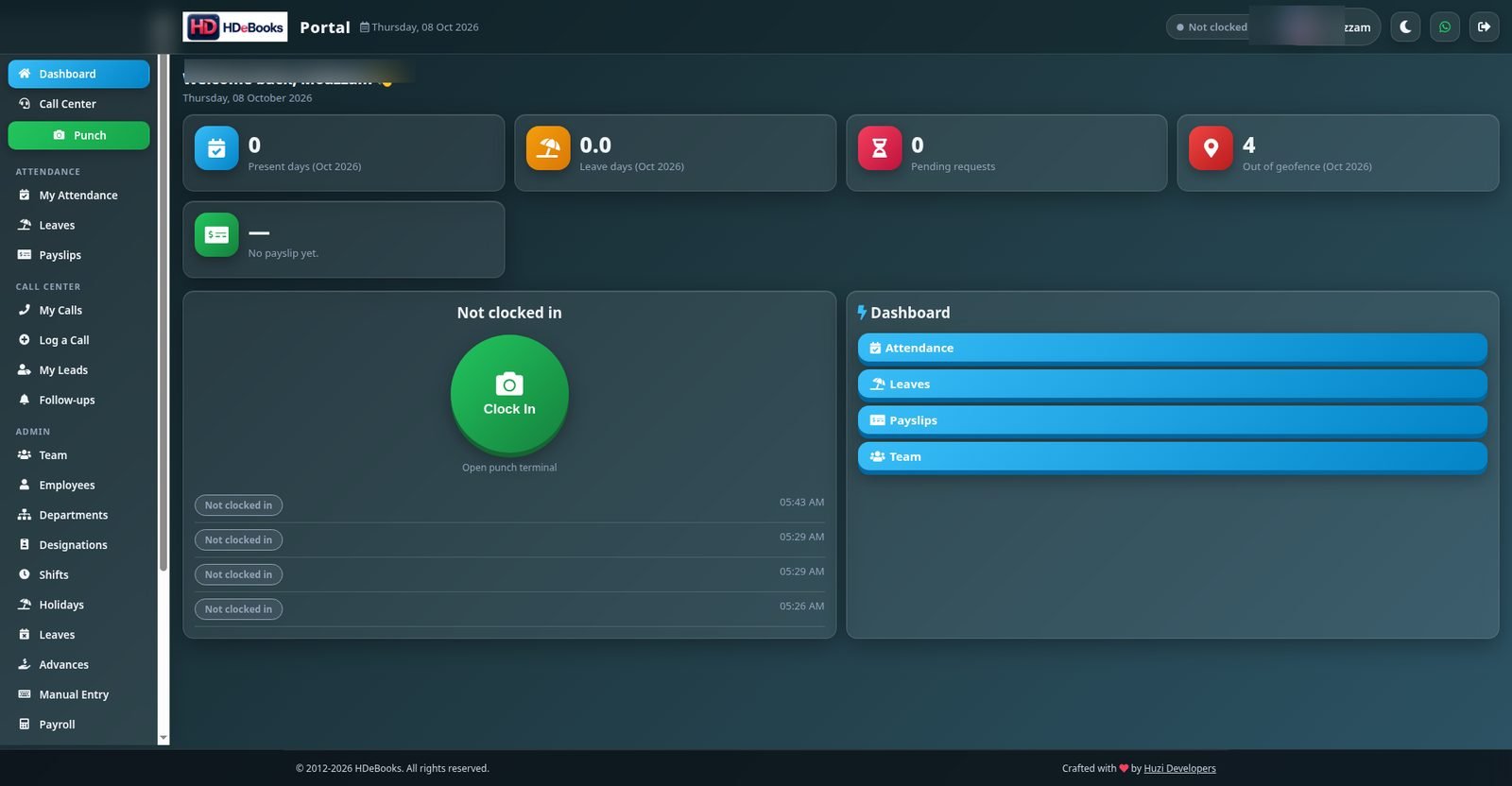
Personal dashboard with present days, leave days, pending requests and out-of-geofence punches
Big green Clock In terminal — one tap to punch in and out, with selfie, GPS and IP recorded on every punch
Geofence tracking — only in-geofence clock-ins count as Present; out-of-geofence punches are flagged with amber warnings
Monthly attendance calendar — colour-coded days (green on time, red absent, amber leave, gray off day) with late time inside each day cell
Leave requests with balances, admin approval view and leave-day totals
Monthly payslips employees can open and download themselves
Team roster: the whole staff’s daily Present/Absent status on one screen
Employee directory with departments, designations and salaries
Payroll run: per-month present, leave, absent, advance and net per employee, with one-click Print All Payslips
Salary advances recorded once and deducted automatically in payroll
Per-employee financial ledger with date-range selection
ZKTeco biometric import — upload device CSV exports straight into attendance
Attendance reports with date filters, export, and anomaly flags like “Missing out”
Call-center side: log calls, manage leads, work the follow-up queue
Full finance suite: expenses, income, accounts, assets, P&L, trial balance and balance sheet
Capital contributions tracked as equity — excluded from P&L income, not earnings
Double-entry journal and chart of accounts with letterhead logo on printed documents
Role-based access: Admin, Viewer, and per-user finance permissions — you can only grant what you hold
Help built in: every page links to its own help topic at hdebooks.com/portal-help
Header help icon — an info icon on every page deep-links to that exact page’s help topic
Admin attendance calendar — pick any month and employee to see daily in–out times, late time (amber) and overtime (blue)
Reports open on today’s date, and overnight clock-outs before 6 AM count toward the previous day’s shift
Lead action menu — Edit, Log Call, Mark as New / Contacted / Qualified / Won / Lost, or Delete, per lead
Department-scoped holidays — a holiday can apply to selected departments only
Manual attendance rows tagged “Manual” on Team view, calendar and reports
Dark and light mode, with a WhatsApp support widget in the header
See it working.
Punch in from anywhere — the geofence keeps it honest
The Clock In terminal is the first thing employees see. Every punch is location-checked, and the dashboard counts out-of-geofence punches where everyone can see them.
- ✓ One-tap Clock In / Clock Out terminal
- ✓ Out-of-geofence punches flagged automatically
- ✓ “Missing out” flag when someone forgets to clock out
The whole team at a glance
The Team roster shows every employee’s daily status — Present or Absent — on a single screen. No more asking around to see who showed up.
- ✓ Daily Present/Absent badges per employee
- ✓ 23+ employee records with department and designation
- ✓ Departments, designations, shifts and holidays managed in one place
Finance that lives with HR
The Portal is not just attendance — it runs the company money too. Expenses, income, accounts and assets live next to payroll, with P&L, trial balance and balance sheet on top.
- ✓ Expenses, income, accounts and assets in one place
- ✓ Capital deposits treated as equity — never counted as income
- ✓ P&L, trial balance, balance sheet and double-entry journal
Payroll that runs itself
Run payroll for the month and every employee’s present, leave, absent, advance and net is computed in one table. Advances deducted automatically, payslips published to each employee’s portal.
- ✓ Per-month payroll table with one-click run
- ✓ Salary advances auto-deducted from net pay
- ✓ Per-employee ledger with full financial history
Using Portal, step by step.
From a fresh install to daily routine — here's the whole journey.
Real screenshot — staff data blurred for privacy. Click to enlarge.
Employees sign into their portal
Each employee gets their own portal login — separate from the main HDeBooks app, limited to self-service.
- Own login at your /portal/ address
- Sees only their own data
- Dark and light mode included
Punch in and out daily
One tap on the Clock In terminal records the punch with location. The dashboard tracks present days and flags out-of-geofence punches.
- Big green Clock In button
- Selfie capture on punch
- Out-of-geofence counter on dashboard
Manage their own attendance life
Employees check the monthly attendance calendar, request leaves with balances shown, and open their payslips — no HR visit needed.
- Monthly calendar with Present/Leave marks
- Leave requests with admin approval
- Downloadable monthly payslips
Call agents work their queue
Agents log every call with disposition and notes, manage their leads, and work through scheduled follow-ups with overdue alerts.
- Log a Call form with dispositions
- Lead list with source, status, agent
- Follow-up queue with overdue flags
Admins run the back office
HR sees the Team roster, approves leaves, records advances, runs monthly payroll and pulls attendance reports with export. Finance admins record expenses and income, and grant access to others.
- Approve/reject leave requests
- Record salary advances
- Run payroll, publish payslips
- Export attendance reports
- Grant finance access — only what you hold yourself
Import biometric data
Upload ZKTeco device CSV exports to bulk-load attendance, or correct a day with manual attendance entry.
- ZKTeco CSV upload (up to 5 MB)
- Manual attendance entry per employee
- Anomaly flags for missing punches
Portal questions.
Yes. The Portal lives at its own address (your /portal/) with its own login. Employees never see the main app’s menus, sales or accounts — only their self-service pages.
No. Portal logins are limited to self-service: punch, attendance, leaves, payslips and (for agents) calls and leads. Admins keep the full back office.
Each punch is location-checked against your work geofence. Punches made outside it are counted as “Out of geofence” on the dashboard and in reports, so remote or off-site punches are always visible.
Yes — upload your ZKTeco device’s CSV export and attendance populates in bulk. Admins can also fix individual days with manual attendance entry.
Yes. The monthly payroll run computes present, leave, absent, advance and net pay per employee, deducts recorded salary advances automatically, and publishes a payslip to each employee’s portal.
Yes. Beyond HR and payroll, the Portal has a full finance suite: expenses, income, accounts, assets, profit & loss, trial balance, balance sheet, a double-entry journal and a chart of accounts. Capital deposits (like owner capital) are treated as equity and excluded from P&L income. Access is per-capability — each user only sees the finance pages they have been granted.
Full app admins can grant anything. Portal admins can only grant finance capabilities they hold themselves — greyed-out boxes on the permissions page are ones they do not have. Viewers can only see the dashboard, reports and call-center pages.
Every Portal page has an info icon in the header that jumps straight to its own help topic at hdebooks.com/portal-help — for example, the Expenses page links to #expenses and Payroll to #payroll.
Agents log calls with contact, direction, disposition, duration and notes, manage leads by source and status, and work a follow-up queue with overdue alerts. Admins manage agents, dispositions and a full call audit trail.
More addons.
Manufacturing
Recipes, production batches and true costing for manufacturers, bakeries, restaurants and workshops.
Read more →Call Center
Call logging, lead pipeline and agent performance tracking for sales and support teams.
Read more →Activity Monitor
A lightweight Windows agent that logs PC activity to your HDeBooks dashboard.
Read more →Ready to run your entire business on HDeBooks?
Tell us about your business and we'll set up a free demo — POS, billing, inventory, accounts, HR, payroll and CRM, plus the addons you need.