
Amazon Relay
Amazon Relay settlements, done right — every trip, every driver, every week.

What is Amazon Relay?
The Amazon Relay module settles your Amazon Relay drivers week after week without spreadsheets. Import the week’s trips from a CSV — drivers are created automatically — and the module calculates Amazon’s payout, your commission, weekly insurance deductions and each driver’s net pay. Rejected loads stay visible at $0.00 in red so nothing is forgotten, payments are recorded against settlements, and the ledger keeps the full history.
What Amazon Relay does.
Drop in the week’s Amazon Relay settlement CSV and every trip lands in the right week — drivers are created automatically from the import, never typed in by hand. Trips can also be added manually on the Trips page.
Trips group into weekly settlement periods with their own invoice dates. Open a week to see every trip, amount and deduction in one place.
Your commission percentage and the weekly insurance deduction apply automatically per driver. Figures recalculate live as you type — no stale numbers, ever.
When Amazon rejects a load — a whole block or a blank block ID — those trips stay on the settlement at $0.00 in red, with color-coded rejection reasons, so they’re chased, not forgotten.
Record payouts against finalized settlements. A payment can be deleted cleanly — the settlement returns to draft and leaves the ledger — and the ledger itself supports deleting any status with trips returning to unsettled.
A trip landed in the wrong week? Move it per-trip to the correct settlement in one click — amounts and totals follow it automatically.
Tick trips and add selected — or all — to a chosen week in one step. Each driver gets their own draft settlement, and you can reassign the trips to a chosen driver as you add them.
A standalone invoices list: view, print, edit or delete any invoice. Commission %, insurance and deductions recalculate live, and the invoice date is editable.
Import separates Regular Blocks, Spot Loads and Both into tabs. Cancelled loads import too and behave like cancelled blocks — nothing falls through the cracks.
Add insurance top-ups any time — new total = remaining balance + new amount. History shows as a dated timeline (opening row, top-ups, deductions), and weeks with no insurance movement can be hidden. No insurance on file? Every insurance figure shows “—” instead of a misleading balance.
Driver-linked documents plus company-level documents — Agreement, Insurance, Termination letter, Drug Test, Tax Docs — stored with the settlement data.
See it working.
A full week settles in minutes
The weekly routine is import, review, finalize, pay. The module does the arithmetic; you do the checking.
- ✓ Import the CSV — trips and drivers appear on their own
- ✓ Review rejected loads and move any misplaced trips
- ✓ Set the invoice date, check the live-calculated figures
- ✓ Finalize the week and record each driver’s payment
Rejected loads never disappear
Rejected work is the easiest money to lose track of. Here it stays on the books, impossible to miss.
- ✓ Whole-block and blank-block rejections import at $0.00 in red
- ✓ Rejection reasons are managed and color-coded
- ✓ Red rows act as reminders until the dispute is resolved
Numbers you can trust while you type
Every figure on the settlement recalculates the moment you change an input — and filters apply themselves.
- ✓ Live auto-calculation on commissions, deductions and net pay
- ✓ Filters apply on selection — no extra clicks
- ✓ Invoice dates tracked per settlement for clean records
Using Amazon Relay, step by step.
From a fresh install to daily routine — here's the whole journey.
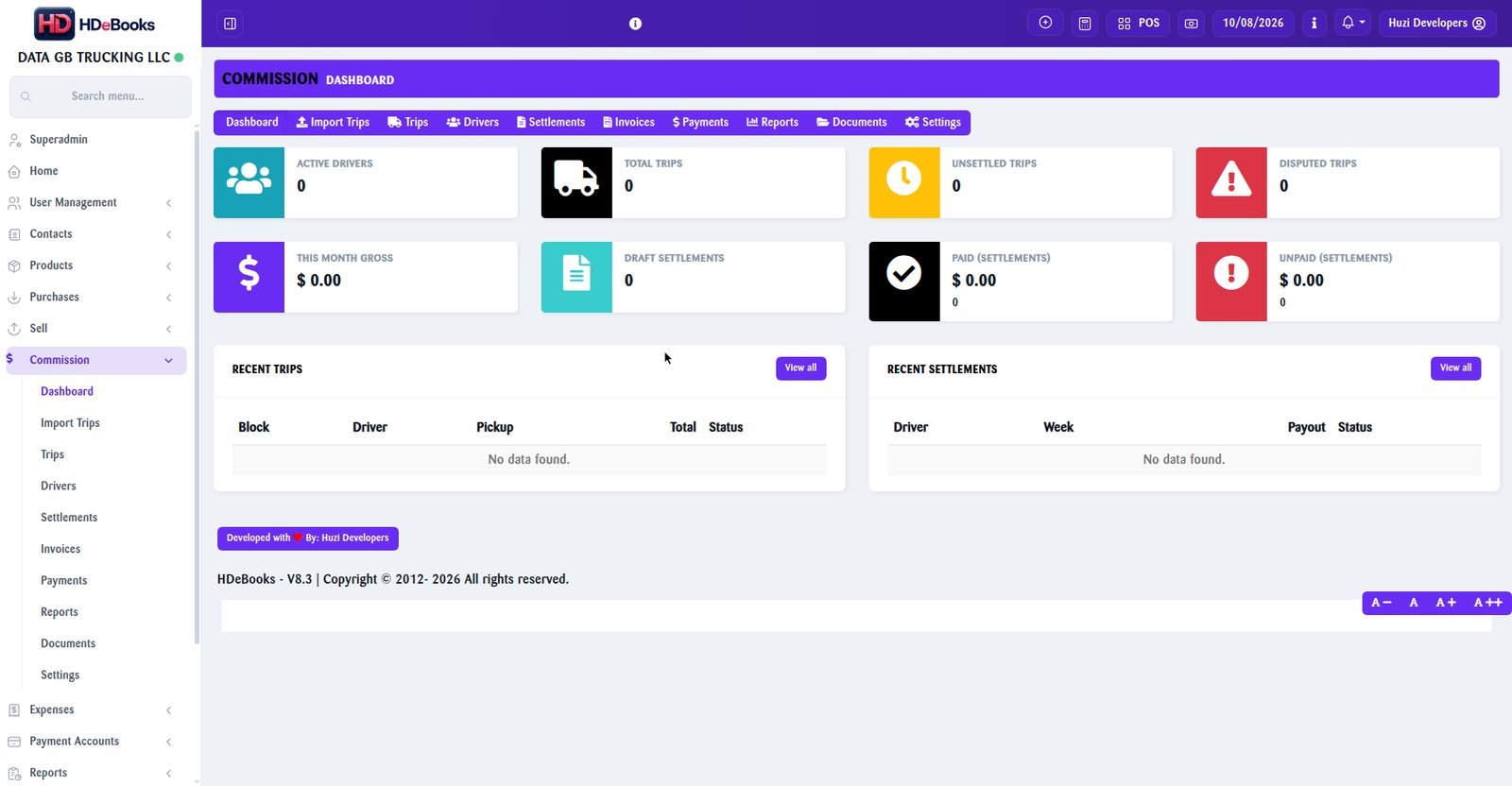
Real screenshot — staff data blurred for privacy. Click to enlarge.
Import the week’s trips
Download the settlement CSV from Amazon Relay and import it. The module reads every trip — date, block, legs, amounts — and creates any new drivers it finds automatically.
- One CSV per week; trips land in the matching settlement period
- Drivers are auto-created from the import — never added manually
- Import history kept, with automatic column detection
Review trips and rejections
Open the week and scan the trip list. Rejected loads show at <b>$0.00 in red</b> with their rejection reason color-coded beside them.
- Rejected blocks and blank block IDs flagged instantly
- Move any trip to the correct week with one click
- Totals recalculate live as you adjust
Set commission, insurance and invoice date
Confirm the week’s commission percentage and weekly insurance deduction per driver, and stamp the settlement with its invoice date.
- Per-driver commission and insurance figures
- Invoice date recorded on every settlement
- Net pay per driver calculated automatically
Finalize the settlement
When the numbers look right, finalize the week. Finalized settlements lock the figures and post to the driver ledger.
- Finalize only when you’re satisfied — drafts stay editable
- Locked figures feed the ledger and reports
Pay your drivers
Record each driver’s payout against the finalized settlement. Paid the wrong amount? Delete the payment — the settlement returns to draft and the entry leaves the ledger, cleanly.
- Payments linked to settlements, not floating entries
- Delete a payment to undo it properly — no ghost rows
- Full per-driver payment history
Ledger, reports and print
The ledger holds every settlement and payment with printable layouts. Filter by driver or week, and export what your accountant needs.
- Complete settlement and payment history per driver
- Print-friendly settlement and ledger layouts
- Trips return to unsettled if a ledger entry is removed
Amazon Relay questions.
You never add them manually — drivers are created automatically the first time their name appears in a CSV import.
Rejected trips stay on the settlement at $0.00 in red with a color-coded rejection reason, so they act as reminders until resolved instead of silently vanishing.
Yes — every trip has a Move action that shifts it to the correct weekly settlement, with all amounts and totals following it.
Delete the payment: the settlement returns to draft status and the entry is removed from the ledger. Nothing is left half-recorded.
Yes — settlements, payments and the ledger are all per-driver, so any number of drivers can be settled side by side each week.
Amazon’s trip payout minus your commission percentage, minus the weekly insurance deduction. Every figure recalculates live as you work.
More addons.
Manufacturing
Recipes, production batches and true costing for manufacturers, bakeries, restaurants and workshops.
Read more →Call Center
Call logging, lead pipeline and agent performance tracking for sales and support teams.
Read more →Activity Monitor
A lightweight Windows agent that logs PC activity to your HDeBooks dashboard.
Read more →Ready to run your entire business on HDeBooks?
Tell us about your business and we'll set up a free demo — POS, billing, inventory, accounts, HR, payroll and CRM, plus the addons you need.